// case study
Master Blaster Hub
Full-stack service-business platform with customer and administrator portals, built with React and Spring Boot and deployed on AWS with automated CI/CD.
Completed· AWS deployment shut down to control costs· Feb – Mar 2026
Overview
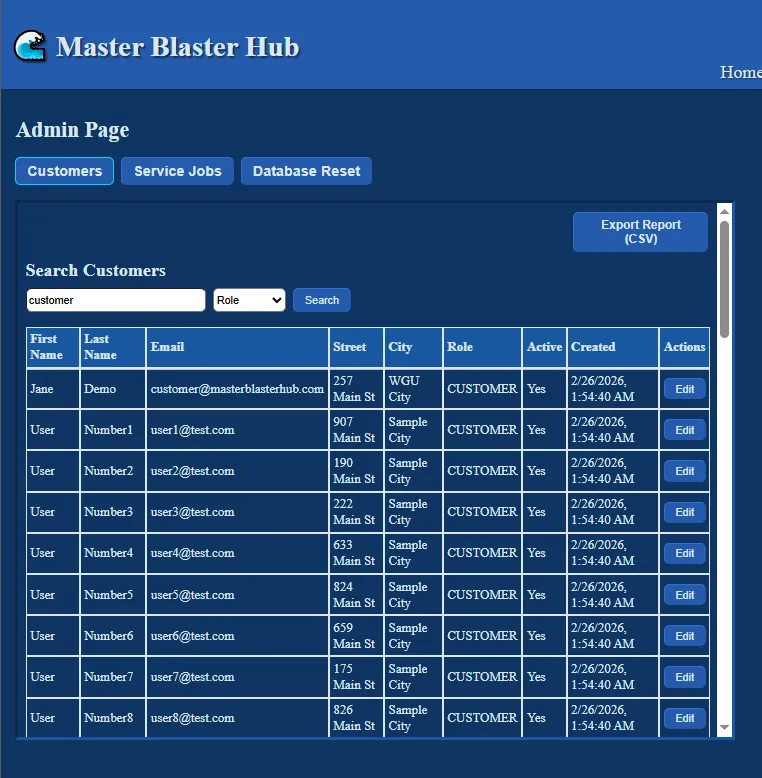
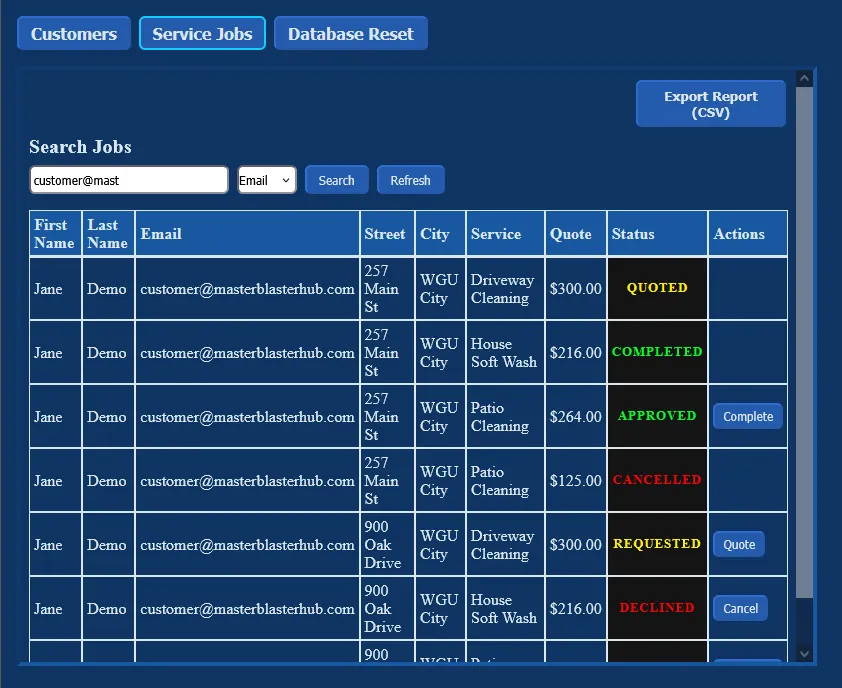
Master Blaster Hub is a full-stack web application for running a service business. Customers create an account, add the locations where they want work done, request services, and approve or decline the quotes they receive. Administrators search customers and jobs, quote and complete work, export reports, and reset the demo data.
The application is a React single-page app talking to a Spring Boot REST API, with data stored in MongoDB Atlas. It ran on AWS, with the frontend served from S3 through CloudFront and the backend running as a Docker container on Amazon ECS with Fargate behind an Application Load Balancer. Two GitHub Actions workflows deployed every change automatically.
Status: The project is complete. After it was finished, the AWS deployment was shut down to control costs, so there is no live demo. The recorded walkthrough linked on this page shows the deployed application, the AWS setup, and the CI/CD pipelines.
Problem and motivation
A service business needs to track customers, the locations it services for each of them, and every job from request to completion, including the price quoted along the way. Customers and staff need different views of that data with different permissions: customers should see and change only their own information, while administrators need oversight of everything.
That made authorization a core requirement rather than an add-on. The project also aimed to run the way a production application does. The first automated deployment ran on the third day of development, so features were built and tested against real cloud infrastructure rather than only on localhost.
Technology stack
- Frontend
- React 19
- React Router
- Vite
- CSS Modules
- jwt-decode
- Fetch API
- Backend
- Java 21
- Spring Boot 4
- Spring Web MVC
- Spring Security
- Spring Data MongoDB
- Spring Validation
- jjwt
- BCrypt
- Maven
- Data
- MongoDB Atlas
- AWS
- ECS on Fargate
- ECR
- Application Load Balancer
- S3
- CloudFront
- Route 53
- Certificate Manager
- IAM
- Delivery and testing
- Docker
- GitHub Actions
- JUnit
Architecture
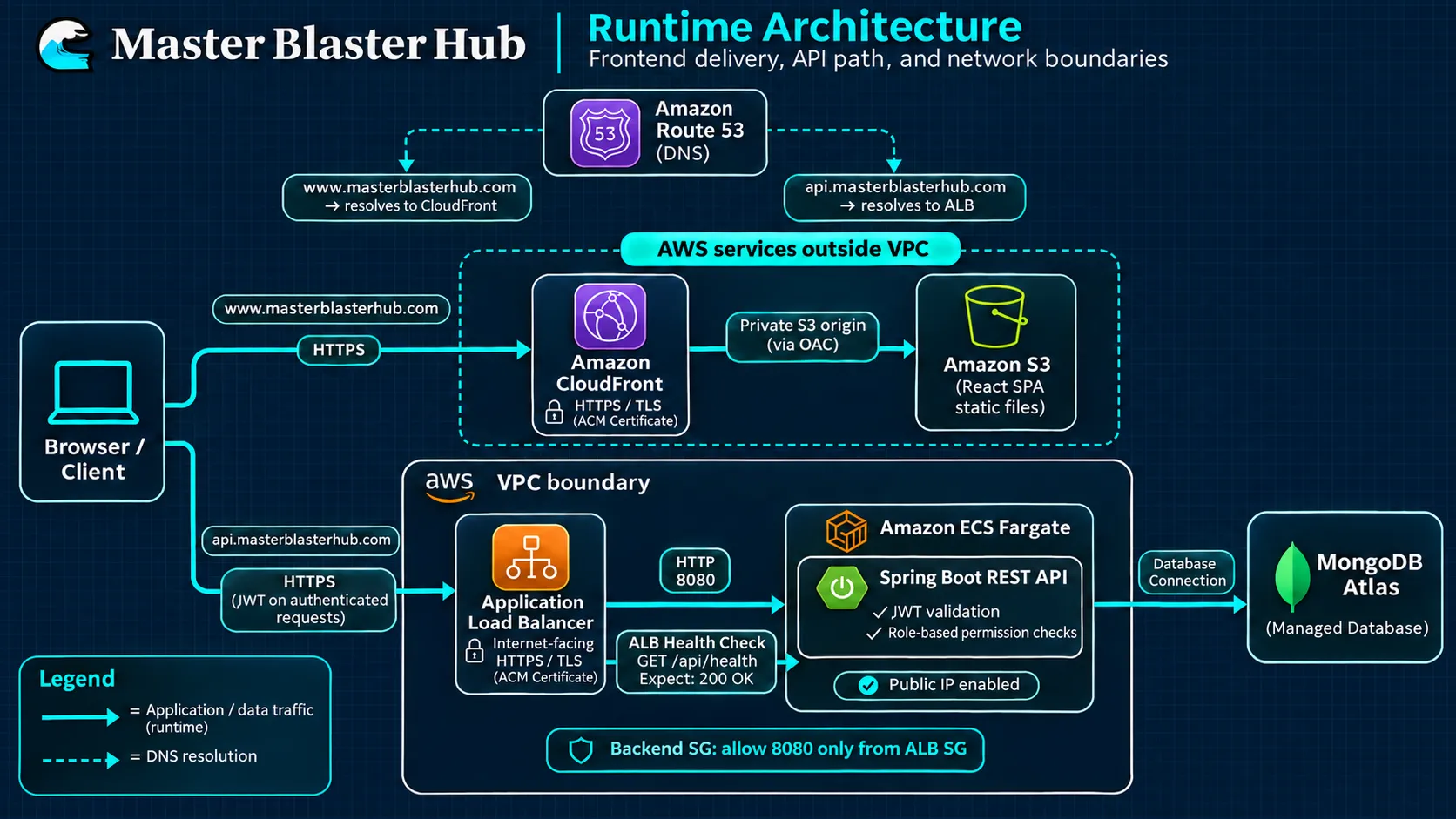
The system has three layers: a static frontend, a containerized API, and a managed database.
Frontend delivery. Vite builds the React app into static files stored in a private S3 bucket. CloudFront serves them over HTTPS with a certificate from AWS Certificate Manager, redirects HTTP to HTTPS, and reads from the bucket through Origin Access Control, so the bucket itself is never public. Route 53 hosts DNS for the domain.
API. The frontend sends requests to an api subdomain, which Route 53 resolves to an internet-facing Application Load Balancer. The load balancer terminates HTTPS and forwards traffic to a target group on port 8080. ECS registers each running Fargate task as a target, and the load balancer checks each one with GET /api/health before sending it traffic.
Network boundaries. Two security groups separate public and private traffic. The load balancer’s group accepts HTTP and HTTPS from the internet. The backend’s group accepts traffic on port 8080 only from the load balancer’s group, so the containers can’t be reached directly.
Data. MongoDB Atlas runs outside AWS as a managed service. The container receives the database connection settings and the JWT signing secret as environment variables, so no credentials live in the source code.
A request for a customer’s portal flows like this:
- The browser loads the React app from CloudFront.
- The app calls the API at the
apisubdomain with the user’s JWT attached. - Route 53 resolves the subdomain to the load balancer, which forwards the request to a healthy Fargate task.
- Spring Boot validates the token, checks permissions, and reads or writes MongoDB Atlas.
Key engineering decisions
Embedded documents in MongoDB. Each user document holds that user’s addresses, and each address holds its job history. A customer’s portal is built from a single document read, which matches how the data is used most often. The tradeoff is that system-wide job searches have to scan across users. That is acceptable at this scale, but a larger system would move jobs into their own collection.
Stateless JWT authentication. Passwords are hashed with BCrypt. A successful login returns a signed token that expires after one hour and carries the user’s email, role, and first name. A filter validates the token on every request and records who the caller is. Because the server keeps no session state, any container behind the load balancer can handle any request. The frontend reads the token’s expiry to log the user out automatically and route them back to the homepage.
Authorization in the controllers. Spring Security’s route rules let every request through. The JWT filter establishes who the caller is, and each protected endpoint checks permissions itself:
- Admin actions look up the current user in the database and ask a permission service whether the action is allowed. A small factory picks
AdminPermissionServiceorCustomerPermissionServicebased on the user’s role, so the rules for each role live in one place. - Customer endpoints act only on the authenticated user’s own data.
- Job status changes are checked against role-specific transition rules.
The role comes from the database record rather than from the token, so a stale or altered claim can’t grant access. The React app also hides routes a user’s role can’t use, but the server checks are the ones that actually enforce access.
An explicit job lifecycle. A job moves through defined states: requested, quoted, approved or declined, then completed or cancelled. When an administrator moves a job to quoted, the backend calculates the price from the service’s pricing rules. Invalid transitions are rejected with a clear error.
Static frontend, containerized API. Serving the frontend as static files from S3 and CloudFront keeps it simple to host and cache, and lets it deploy independently of the API. Running the API on Fargate meant there were no EC2 instances to patch or manage.
Environment-based configuration. The frontend reads its API address from a build-time variable, so the same code targets the local backend in development and the production API when deployed. The backend reads its database and JWT settings from the environment in the same way.
Deployment and infrastructure
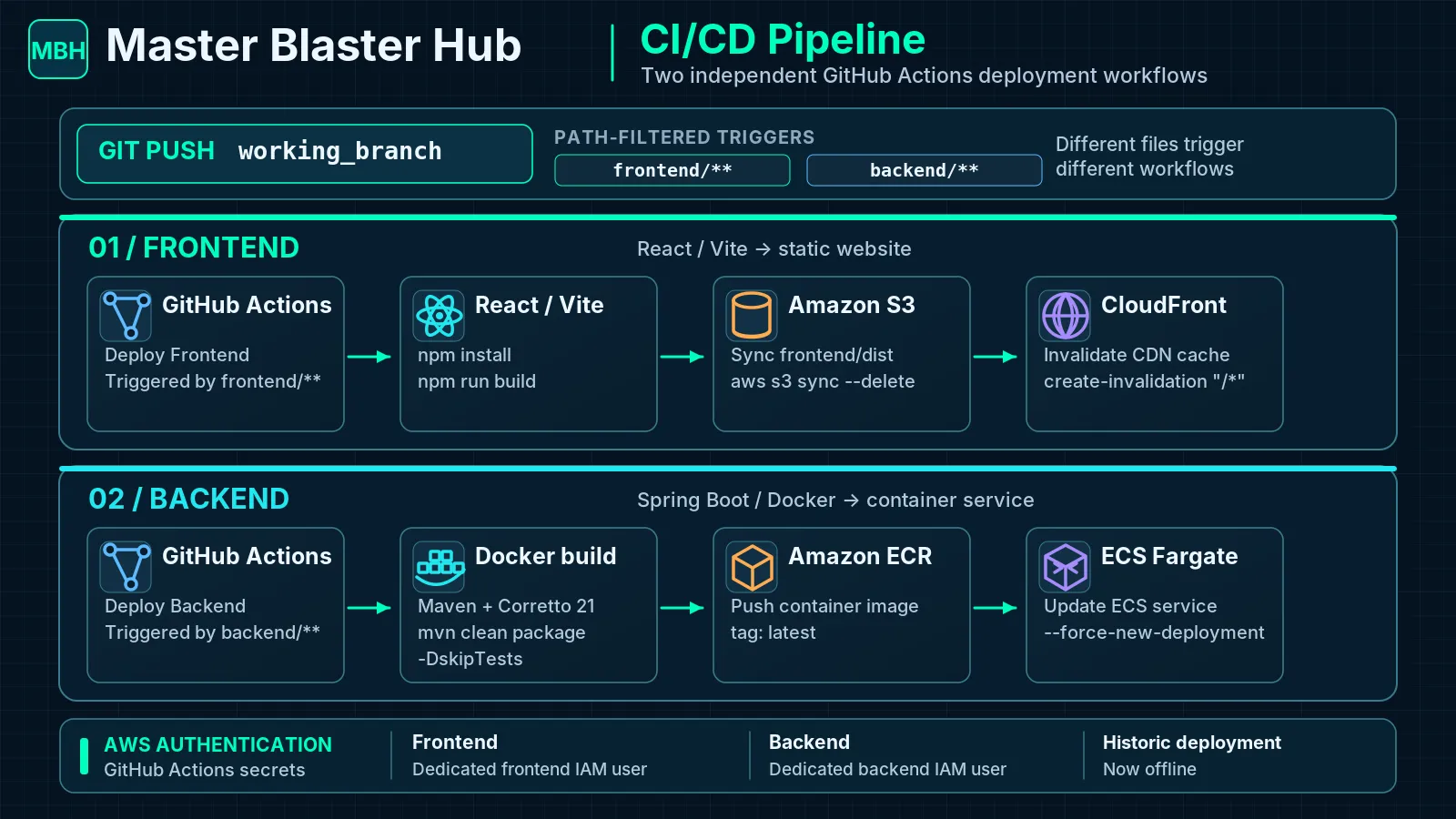
Both parts of the application deploy automatically when changes are pushed to the working branch. Each workflow runs only when files in its own folder change, so a frontend fix never rebuilds the backend.
Frontend workflow. Installs dependencies, builds the production bundle, syncs it to S3 (removing files that no longer exist), and invalidates the CloudFront cache so visitors receive the new version immediately.
Backend workflow. Builds the Docker image, pushes it to a private ECR repository, and forces a new ECS deployment. The Dockerfile uses a multi-stage build: one stage compiles the application with Maven on Amazon Corretto 21, and the final image contains only the Java runtime and the packaged JAR. ECS then starts a new task with the updated image and replaces the old one.
Credentials. Each workflow authenticates with its own dedicated IAM user, and the access keys are stored as encrypted GitHub repository secrets. The frontend user’s permissions are limited to the production bucket and the CloudFront invalidation it needs.
Infrastructure setup. The domain was registered with an external registrar and delegated to Route 53. Certificates came from AWS Certificate Manager. The ECS cluster, service, load balancer, and security groups were created through the AWS console.
Challenges and troubleshooting
Load balancer health checks failing during the security work
What happened. Partway through adding JWT authentication, the deployed backend stopped serving traffic: its ECS tasks were failing the Application Load Balancer’s health checks. A series of redeployments over the next few hours didn’t restore it.
Investigation. Working from the ECS service logs, with AI assistance, the investigation focused on the Spring Security configuration and whether the health-check endpoint was reachable. The load balancer calls that endpoint without a token and expects a 200 response, so any security rule that blocks unauthenticated requests to it fails the check. Several configuration changes were tried during this period, including one that made the access rules stricter.
Resolution. The next day, the security configuration was reworked. The route rules went back to letting requests through at the Spring Security layer, and the cross-origin (CORS) configuration moved into the Spring Security configuration. A dedicated HealthController, whose only job is answering the load balancer, replaced the general-purpose controller that had been handling health checks. The JWT filter was registered in the security chain, and authorization was built into the controllers. After these changes the tasks passed their health checks and the deployment was healthy again.
Confirmed versus inferred. The commit history confirms the failing health checks, the configuration changes, the new health endpoint, and the recovery. It doesn’t pin down a single original trigger: the failures began before the stricter access rule was committed, so that rule wasn’t the starting point. The changes that restored the service point to the security configuration and the health endpoint’s accessibility as the area responsible.
Lessons learned. Security rules affect infrastructure as well as users: health checks, monitoring, and other automated callers need to be accounted for whenever access rules change. A dedicated health endpoint also keeps infrastructure checks separate from application routes, so changes to one are less likely to break the other.
Getting the frontend pipeline to deploy
The first automated frontend deployment took a series of fixes in one day. The frontend lives in a subfolder of a repository that also holds the backend, and the workflow initially pointed at the wrong working directory and build output path. The S3 bucket was recreated to match the domain. The workflow’s path filter was removed temporarily to confirm the trigger worked, then restored. A CloudFront cache invalidation was added at the end, because without it visitors kept receiving the previously cached files after a successful deployment.
Testing
Five JUnit tests cover the permission rules in the service layer:
- A customer can’t delete a user.
- An administrator can delete a regular account.
- An administrator can’t delete a protected system account.
- A customer can’t view reports.
- An administrator can view reports.
All five pass. They test the permission logic in isolation, without a database.
Results and lessons learned
The finished system supports the full customer and administrator workflows, ran on AWS over HTTPS on a custom domain, and deployed both halves automatically on every push. Once the project was complete, the AWS deployment was shut down to avoid ongoing costs.
The main lessons:
- Security configuration affects infrastructure. It can break health checks and other automated traffic as easily as user requests.
- Pipelines in a shared repository need explicit paths. Working directories, build outputs, and trigger filters all have to agree.
- Separate deployments make releases simpler. Deploying the frontend and backend independently meant each change only rebuilt what it touched.
Future improvements
- GitHub OIDC to give the workflows short-lived AWS credentials instead of long-lived IAM access keys.
- Tighter IAM permissions for the deployment pipelines.
- Managed secrets in AWS Secrets Manager or Systems Manager Parameter Store, injected into the ECS task, instead of plain environment variables.
- Route-level authorization in Spring Security alongside the controller checks, with the health and authentication endpoints explicitly public.
- Tests in the pipeline, run before the Docker image is built.
- Infrastructure as code with Terraform or CloudFormation, so the environment can be reviewed, versioned, and recreated.
- Additional hardening of the API and of network access to the database.